
The logbook bridge
OM0RX xBridge
Keep RUMlogNG and Wavelog connected through a native Mac application with durable synchronization state.
Apple Silicon · macOS 13+Free download · 0.3.1
Download xBridge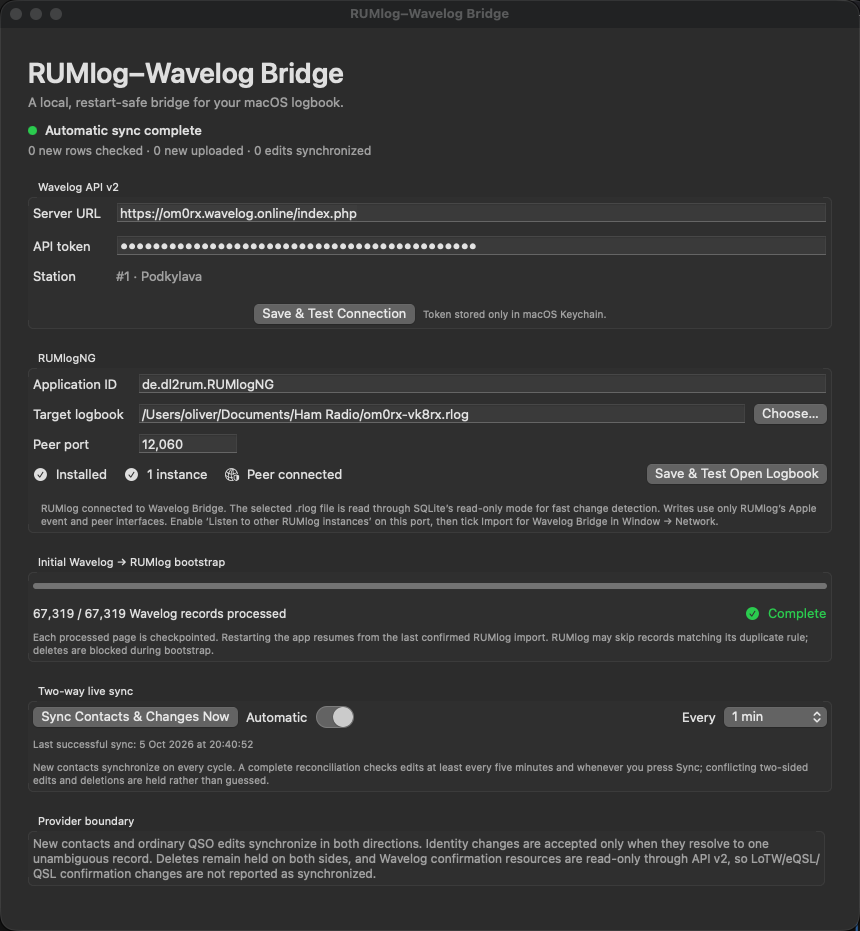
Built around the operator
The logbook bridge.
xBridge is for operators who keep RUMlogNG as their main logbook and want a Wavelog connection. It synchronizes new contacts in both directions and reconciles fields that both products can persist.
The local RUMlog database is read through a query-only connection. Imports and remote edits use RUMlogNG’s application and peer interfaces, with durable identity tracking and an outbox to survive interrupted deliveries.
In the workspace
What you can do.
Two-way contact flow
Restart-safe bootstrap and automatic new-contact synchronization after the initial setup.
Shared-field reconciliation
Supported edits are checked with destination readback instead of assuming that a request succeeded.
Ambiguity stays visible
Conflicting changes, deletions and uncertain delivery outcomes are held for review.
Local credential storage
The Wavelog API token is stored in macOS Keychain, with separate station-profile configuration.
Availability
At your station.
- Current version
- 0.3.1 · build 13
- Connects
- RUMlogNG ↔ Wavelog
- Cost
- Free
Before you begin
- Apple Silicon Mac running macOS 13 or later.
- RUMlogNG open with the intended logbook.
- A Wavelog API v2 account and station profile, plus the required macOS Automation approval.
Developer ID signed with hardened runtime; not Apple-notarized. Version 0.3.1 improves first-install Wavelog onboarding while preserving existing saved settings, Keychain entries and automatic synchronization. Live accounts, RUMlog synchronization and Gatekeeper launch acceptance were not tested for this package.
Request source code ↗Download xBridge
Free access to the Mac application and its matching source snapshot. Development repositories and history remain private; these release archives include the applicable licence and notices.
2.62 MB · Apple Silicon · macOS 13+
Verify SHA-256 checksum
ae80648fad7a41d1121ecbd0472b18587e5a46bb54e0cc30408e8ca3d5071d833.36 MB · Source for this exact release
Verify SHA-256 checksum
da3cb048828bea75c36fd9a379fbb9ff798f51f3bb93a4b34c52a7ee2350360bTo install, extract the application ZIP, move the app to Applications and review its settings before connecting your station. These signed builds are not notarized; macOS security checks may prevent launch. The source ZIP is provided alongside the executable at no charge. See its LICENSE and NOTICE for redistribution and source rights.